Campaign tracking is one of the most fundamental strategies to increase conversion for your company. Campaign tracking is a huge topic.
Read more from 1 | 2 | 3 | ...
Terminology
VISTA
SAINT
Tuesday, March 10, 2015
Digital Marketing - Online Sales Campaign Tracking
Posted by My Tech Blog 0 comments
Saturday, June 21, 2014
Responsive web design (RWD) - Step by Step
Responsive web design (RWD) is a web design approach aimed at crafting sites to provide an optimal viewing experience—easy reading and navigation with a minimum of resizing, panning, and scrolling—across a wide range of devices including mobile phones, tablets, gaming devices, televisions, and an ever-growing array of Internet-connected devices.
Responsive design techniques - you should know some, if not, check it out.
Building responsive web designs with Adobe Edge Reflow - Must check it out
Posted by My Tech Blog 0 comments
Saturday, June 14, 2014
Demographic Profiling vs. Behavioral Modeling
1) Demographic - This is a set of characteristics like gender, age, marital status, geographic location, socio-economic status, etc. It provides enough information to create a mental picture of the typical member of the hypothetical group. For example, a marketer might speak of the "single, female, middle-class, age 18 to 24, college educated demographic."
2) Behavioral - This type of profiling is more concerned with what the customer is actually doing. It cares only about customer activity. This is infinitely more important than demographical information.
The first is pretty typical and any crm can store information like age, address, and even supply custom fields for information like socio-economic status (perhaps in the form of a "score" or comparative rating). When it comes to behavioral data, some web tagging system makes this achievable.
What are customers doing? When's the last time they've engaged with my website? How long have they gone without purchasing? How long have they gone without clicking on a link? Will they visit again? Will they buy again? These are the questions answered by collecting and analyzing behavioral data.
Simply put - customer behavior is a much stronger predictor of your future relationship with a customer than demographic information will ever be.
Granted, demographic profiling is useful if your business relies on selling advertising. But even then, the behavioral profile trumps it because if the customer stops visiting your site or interacting with you, you're not going to have eyeballs to serve ads to, no matter how personalized or customized to the visitor's demographic profile the ads may be.
Customer modeling is probably a better word for the latter profile because it is action-oriented. Models aren't about "set-in-stone" characteristics like "my customer is a female between the age of 18 and 24." Models are about actions over time like, "If a customer does not make a purchase in the next 30 days, they are unlikely to come back and make any further purchases." That's a model.
Modeling seeks to look at customers who are engaging in a certain behavior and tries to find a commonality in them.
The real power comes in combining both demographic and behavioral data to produce an even crystal clearer picture of the customer. Just remember that if you must choose, always go with behavior. If you've got finite dollars and one company offers to analyze and compile the demographics of your customer base versus another analyzing behavioral trends and actions, go with the latter.
Read full
Posted by My Tech Blog 0 comments
Sunday, August 18, 2013
Data Multi-tenancy
- Connections could point specifically to each
schema, as we saw with the Separate
databaseapproach. This is an option provided that the
driver supports naming the default schema in the connection URL or if the
pooling mechanism supports naming a schema to use for its Connections.
Using this approach, we would have a distinct JDBC Connection pool
per-tenant where the pool to use would be selected based on the “tenant identifier” associated with the currently logged in user.
- Connections could point to the database itself
(using some default schema) but the Connections would be altered using the
SQL SET
SCHEMA (or similar) command. Using this approach, we would have a single
JDBC Connection pool for use to service all tenants, but before using the
Connection it would be altered to reference the schema named by the “tenant identifier” associated with the currently logged in user.
Posted by My Tech Blog 0 comments
Sunday, August 11, 2013
Spring JDBCTemplate Vs Hibernate Performance + JPA & Caching
Spring JDBCTemplate Vs Hibernate Performance
If you do all you can to make Spring JDBCTemplate / Hibernate implementations very fast, the JDBC template will probably be a bit faster, because it doesn't have the overhead that Hibernate has, but it will probably take much more time and lines of code to implement.
Hibernate has its learning curve, and you have to understand what happens behind the scenes, when to use projections instead of returning entities, etc. But if you master it, you'll gain much time and have cleaner and simpler code than with a JDBC-based solution.
In 95% of the cases, Hibernate is fast enough, or even faster than non-optimized JDBC code. For the 5% left, nothing forbids you to use something else, like Spring-JDBC for example. Both solutions are not mutually exclusive.
Hibernate
Hibernate is not intended for batch-jobs, it is an anti patterns of O/R Mapper usage. Even the Hibernate documentation warns to not do that. Batch processing often can be much more easily done by a single clever SQL statement instead via O/R mappers which need a bunch of statements to do the same. Not because they are bad, but because they have not been built for this use case. Data is always by default loaded lazyly in Hibernate.
One of the common problems of people that start using Hibernate is performance, if you don’t have much experience in Hibernate you will find how quickly your application becomes slow. If you enable sql traces, you would see how many queries are sent to database that can be avoided with little Hibernate knowledge. Good use of Hibernate Cache to avoid amount of traffic between your application and database.
JPA + Spring
If you are using spring and JPA, it is very likely that you utilize ehcache (or another cache provider). And you do that in two separate scenarios: JPA 2nd level cache and spring method caching.
When you configure your application, you normally set the 2nd level cache provider of your JPA provider (hibernate, in my case) and you also configure spring with the “cache” namespace. Everything looks OK and you continue with the project. But there’s a caveat. If you follow the most straightforward way, you get two separate cache managers which load the same cache configuration file. This is not bad per-se, but it is something to think about – do you really need two cache manager and the problems that may arise from this
JPA & Caching
Caching is the most important performance optimization technique. There are many things that can be cached in persistence, objects, data, database connections, database statements, query results, meta-data, relationships, to name a few. Caching in object persistence normally refers to the caching of objects or their data.
Caching also influences object identity, that is that if you read an object, then read the same object again you should get the identical object back (same reference).
JPA 1.0 does not define a shared object cache, JPA providers can support a shared object cache or not, however most do.
Caching in JPA is required with-in a transaction or within an extended persistence context to preserve object identity, but JPA does not require that caching be supported across transactions or persistence contexts.
JPA 2.0 defines the concept of a shared cache. The @Cacheable annotation or cacheable XML attribute can be used to enable or disable caching on a class.
Hibernate cache
Cache Types : Hibernate uses different types of caches. Each type of cache is used for different purposes. Let us first have a look at this cache types.
The first cache type is the session cache. The session cache caches object within the current session.
The second cache type is the query Cache. The query cache is responsible for caching queries and their results.
The third cache type is the second level cache. The second level cache is responsible for caching objects across sessions.
The Session Cache
session cache caches values within the current session. This cache is enabled by default.
The Query Cache
The query cache can be really usefull to optimize the performance of your data access layer. However there are a number of pitfalls as well. This blog post describes a serious problem regarding memory consumption of the Hibernate query cache when using objects as parameters. It could consumpt ton of memories and hit
OutOfMemoryError (How to fix it)
The Second Level Cache
The key characteristic of the second-level cache is that is is used across sessions, which also differentiates it from the session cache, which only – as the name says – has session scope. Hibernate provides a flexible concept to exchange cache providers for the second-level cache. By default Ehcache is used as caching provider.
However more sophisticated caching implementation can be used like the distributed JBoss Cache or Oracle Coherence.
Additional readings:
Understanding caching in hibernate (1 | 2 | 3) , tutorial and tuning
Top 10 Performance Problems taken from Zappos, Monster, Thomson and Co
52 weeks of Application Performance – The dynaTrace Almanac
Posted by My Tech Blog 0 comments
Sunday, June 30, 2013
High Availability (HA), Disaster Recovery (DR) & HADR Solution
Posted by My Tech Blog 1 comments
Thursday, June 20, 2013
Virtualization Computing
There are several kinds of virtualization techniques which provide similar features but differ in the degree of abstraction and the methods used for virtualization.
Full virtualazation (VMs)
In computer science, full virtualization is a virtualization technique used to provide a certain kind of virtual machine environment, namely, one that is a complete simulation of the underlying hardware. Full virtualization requires that every salient feature of the hardware be reflected into one of several virtual machines – including the full instruction set, input/output operations, interrupts, memory access, and whatever other elements are used by the software that runs on the bare machine, and that is intended to run in a virtual machine.
Virtual machines emulate some real or fictional hardware, which in turn requires real resources from the host (the machine running the VMs). This approach, used by most system emulators, allows the emulator to run an arbitrary guest operating system without modifications because guest OS is not aware that it is not running on real hardware. The main issue with this approach is that some CPU instructions require additional privileges and may not be executed in user space thus requiring a virtual machines monitor (VMM), also called a hypervisor, to analyze executed code and make it safe on-the-fly. Hardware emulation approach is used by VMware products, VirtualBox, QEMU, Parallels and Microsoft Virtual Server.
Hypervisor
In computing, a hypervisor, also called virtual machine manager (VMM), is one of many hardware virtualization techniques allowing multiple operating systems, termed guests, to run concurrently on a host computer. It is so named because it is conceptually one level higher than a supervisory program. The hypervisor presents to the guest operating systems a virtual operating platform and manages the execution of the guest operating systems. Multiple instances of a variety of operating systems may share the virtualized hardware resources. Hypervisors are very commonly installed on server hardware, with the function of running guest operating systems, that themselves act as servers.
- Type 1 (or native, bare metal) hypervisors run directly on the host's hardware to control the hardware and to manage guest operating systems. A guest operating system thus runs on another level above the hypervisor.
This model represents the classic implementation of virtual machine architectures; the original hypervisors were the test tool, SIMMON, and CP/CMS, both developed at IBM in the 1960s. CP/CMS was the ancestor of IBM's z/VM. Modern equivalents of this are Oracle VM Server for SPARC, the Citrix XenServer, KVM, VMware ESX/ESXi, and Microsoft Hyper-V hypervisor.
- Type 2 (or hosted) hypervisors run within a conventional operating system environment. With the hypervisor layer as a distinct second software level, guest operating systems run at the third level above the hardware. VMware Workstation and VirtualBox are examples of Type 2 hypervisors.
In other words, Type 1 hypervisor runs directly on the hardware; a Type 2 hypervisor runs on another operating system, such as FreeBSD,[4] Linux[5] or Windows.[5] (http://en.wikipedia.org/wiki/Hypervisor)
Paravirtualization
This technique also requires a VMM, but most of its work is performed in the guest OS code, which in turn is modified to support this VMM and avoid unnecessary use of privileged instructions. The paravirtualization technique also enables running different OSs on a single server, but requires them to be ported, i.e. they should «know» they are running under the hypervisor. The paravirtualization approach is used by products such as Xen and UML.
Virtualization on the OS level, a.k.a. containers virtualization
Most applications running on a server can easily share a machine with others, if they could be isolated and secured. Further, in most situations, different operating systems are not required on the same server, merely multiple instances of a single operating system. OS-level virtualization systems have been designed to provide the required isolation and security to run multiple applications or copies of the same OS (but different distributions of the OS) on the same server. OpenVZ, Virtuozzo, Linux-VServer, Solaris Zones and FreeBSD Jails are examples of OS-level virtualization.
The three techniques differ in complexity of implementation, breadth of OS support, performance in comparison with standalone server, and level of access to common resources. For example, VMs have wider scope of usage, but poorer performance. Para-VMs have better performance, but can support fewer OSs because one has to modify the original OS.
Virtualization on the OS level provides the best performance and scalability compared to other approaches. Performance difference of such systems can be as low as 1…3%, comparing with that of a standalone server. Virtual Environments are usually also much simpler to administer as all of them can be accessed and administered from the host system. Generally, such systems are the best choice for server consolidation of same OS workloads.
HP CloudSystem
HP CloudSystem is a cloud infrastructure from Hewlett-Packard (HP) that combines storage, servers, networking and software for organizations to build complete private, public and hybrid Cloud computing environments.
HP CloudSystem is an integrated infrastructure used to create, manage and consume cloud-based services. The cloud types supported are private, public and hybrid. HP has claimed that user organizations can build and deploy new cloud services using HP CloudSystem in minutes.
Comparison of platform virtual machines
VMware ESX
VMware ESX is an enterprise-level computer virtualization product offered by VMware, Inc. ESX is a component of VMware's larger offering, VMware Infrastructure, and adds management and reliability services to the core server product. VMware is replacing the original ESX with ESXi.
VMware ESX and VMware ESXi are bare metal embedded hypervisors that are VMware's enterprise software hypervisors for guest virtual servers that run directly on host server hardware without requiring an additional underlying operating system.
Posted by My Tech Blog 0 comments
Monday, June 17, 2013
How to Analyze Java Thread / Heap Dumps
The content of this article was originally written by Tae Jin Gu on the Cubrid blog.
When there is an obstacle, or when a Java based Web application is running much slower than expected, we need to use thread dumps. If thread dumps feel like very complicated to you, this article may help you very much. Here I will explain what threads are in Java, their types, how they are created, how to manage them, how you can dump threads from a running application, and finally how you can analyze them and determine the bottleneck or blocking threads. This article is a result of long experience in Java application debugging.
Java and Thread
A web server uses tens to hundreds of threads to process a large number of concurrent users. If two or more threads utilize the same resources, a contention between the threads is inevitable, and sometimes deadlock occurs.
Thread contention is a status in which one thread is waiting for a lock, held by another thread, to be lifted. Different threads frequently access shared resources on a web application. For example, to record a log, the thread trying to record the log must obtain a lock and access the shared resources.
Deadlock is a special type of thread contention, in which two or more threads are waiting for the other threads to complete their tasks in order to complete their own tasks.
Different issues can arise from thread contention. To analyze such issues, you need to use the thread dump. A thread dump will give you the information on the exact status of each thread.
Background Information for Java Threads
Thread Synchronization
A thread can be processed with other threads at the same time. In order to ensure compatibility when multiple threads are trying to use shared resources, one thread at a time should be allowed to access the shared resources by using thread synchronization.Thread synchronization on Java can be done using monitor. Every Java object has a single monitor. The monitor can be owned by only one thread. For a thread to own a monitor that is owned by a different thread, it needs to wait in the wait queue until the other thread releases its monitor.
Thread Status
In order to analyze a thread dump, you need to know the status of threads. The statuses of threads are stated on java.lang.Thread.State.Figure 1: Thread Status.
- NEW: The thread is created but has not been processed yet.
- RUNNABLE: The thread is occupying the CPU and processing a task. (It may be in WAITING status due to the OS's resource distribution.)
- BLOCKED: The thread is waiting for a different thread to release its lock in order to get the monitor lock.
- WAITING: The thread is waiting by using a wait, join or park method.
- TIMED_WAITING: The thread is waiting by using a sleep, wait, join or park method. (The difference from WAITING is that the maximum waiting time is specified by the method parameter, and WAITING can be relieved by time as well as external changes.)
Thread Types
Java threads can be divided into two:- daemon threads;
- and non-daemon threads.
A thread running the 'static void main(String[] args)’ method is created as a non-daemon thread, and when this thread stops working, all other daemon threads will stop as well. (The thread running this main method is called the VM thread in HotSpot VM.)
Read original post from here
Commands to create thread dump on solaris:
[user-account@localhost]$ ps -ef | grep java
To list all running java pid
[user-account@localhost]$ pargs pid
To determine which pid is for dump
[user-account@localhost]$ cd %JAVA_HOME%/bin
Go to java binary folder which having jstack command
[user-account@localhost]$ ./jstack -l pid /var/tmp/thread-dump-pid.out
Create the running thread dump
Solaris CMD QRC From Internet
My Google link
Know more about Java Heap Dump Analysis
How to analyze heap dumps
Heap Dump Analysis with Memory Analyzer (1 | 2)
Eclipse Memory Analyzer
Posted by My Tech Blog 1 comments
Sunday, August 5, 2012
Big (unstructure) Data, Grid computing, Hadoop, HDFS & BigTable
Big Data => It is really very big data, imaging u have perabyte data to be processed
You have app server and db. If ur app server need to process perabyte data, it needs to retrieve and copy the data from db to app server first, then process. This is traditional computing, move the data close to processing logic.
if it is small data, it is ok and right way to do that. But if the data volume is big, moving data from db to app server could take days. Just imaging how long it take to copy perabyte data files from one server to another server.
In this case, grid computing comes in and move the logic close to data rather than moving data to processing logic.
If we move logic to data, first of all, you save the time of moving data around. Then, people may argue, then u need to move result back, sure, but most of time, we need to process more data to produce one result, otherwise there is no point to process it, but copy it only.
Doing work by one man is less productive than doing work by more man. The best stratigy is allocate some time to teach others to do the same work and then get others to teach others recursively and do the work. The effect will be 2*2*2*..... faster than doing it alone.
So, we divide & distribute the data to different machines, teach & monitor (Hadoop and map & reduce model - It enables applications to work with thousands of computational independent computers and petabytes of data) them process currently, this is where distributed file system comes into picture (HDFS).
Instead of distributed file system, it could be nicer if we can put them into dictributed db as it could be easier to manage them.
So, What DB we can use? Big Data means unstructured data and it could include text strings, documents of all types, audio and video files, metadata, web pages, email messages, social media feeds, form data, and so on. Big Data may well have different data types within the same set that do not contain the same structure. The consistent trait of these varied data types is that the data schema isn’t known or defined when the data is captured and stored. Rather, a data model is often applied at the time the data is used.
Then BigTable (casandra / HBase / MongoDB) come into picture, it is more of name-value pair + timestamp (NOSQL) DB, each value may have different fields like json string and it can be a nested name-value pair and flexiable enough to cater for any data format.
{
"_id": ObjectId("4efa8d2b7d284dad101e4bc9"),
"Last Name": "DUMONT",
"First Name": "Jean",
"Date of Birth": "01-22-1963"
},
{
"_id": ObjectId("4efa8d2b7d284dad101e4bc7"),
"Last Name": "PELLERIN",
"First Name": "Franck",
"Date of Birth": "09-19-1983",
"Address": "1 chemin des Loges",
"City": "VERSAILLES"
}
Fortunately, Google's BigTable Paper clearly explains what BigTable actually is. Here is the first sentence of the "Data Model" section:
A Bigtable is a sparse, distributed, persistent multidimensional sorted map. It explains that:
The map is indexed by a row key, column key, and a timestamp; each value in the map is an uninterpreted array of bytes.
HBase
HBase is a type of "NoSQL" database. "NoSQL" is a general term meaning that the database isn't an RDBMS which supports SQL as its primary access language, but there are many types of NoSQL databases: BerkeleyDB is an example of a local NoSQL database, whereas HBase is very much a distributed database. Technically speaking, HBase is really more a "Data Store" than "Data Base" because it lacks many of the features you find in an RDBMS, such as typed columns, secondary indexes, triggers, and advanced query languages, etc.
When Should Use HBase?
HBase isn't suitable for every problem.
First, make sure you have enough data. If you have hundreds of millions or billions of rows, then HBase is a good candidate. If you only have a few thousand/million rows, then using a traditional RDBMS might be a better choice due to the fact that all of your data might wind up on a single node (or two) and the rest of the cluster may be sitting idle.
Second, make sure you can live without all the extra features that an RDBMS provides (e.g., typed columns, secondary indexes, transactions, advanced query languages, etc.) An application built against an RDBMS cannot be "ported" to HBase by simply changing a JDBC driver, for example. Consider moving from an RDBMS to HBase as a complete redesign as opposed to a port.
Third, make sure you have enough hardware. Even HDFS doesn't do well with anything less than 5 DataNodes (due to things such as HDFS block replication which has a default of 3), plus a NameNode.
HBase can run quite well stand-alone on a laptop - but this should be considered a development configuration only.
What Is The Difference Between HBase and Hadoop/HDFS?
HDFS is a distributed file system that is well suited for the storage of large files. It's documentation states that it is not, however, a general purpose file system, and does not provide fast individual record lookups in files. HBase, on the other hand, is built on top of HDFS and provides fast record lookups (and updates) for large tables. This can sometimes be a point of conceptual confusion. HBase internally puts your data in indexed "StoreFiles" that exist on HDFS for high-speed lookups.
What are the real life BIG DATA use cases we can use Hadoop or similar technologies and where to start?
Check out Cloudera and use cases from their recommendation:
E-tailing
- Recommendation engines — increase average order size by recommending complementary products based on predictive analysis for cross-selling.
- Cross-channel analytics — sales attribution, average order value, lifetime value (e.g., how many in-store purchases resulted from a particular recommendation, advertisement or promotion).
- Event analytics — what series of steps (golden path) led to a desired outcome (e.g., purchase, registration).
Financial Services
- Compliance and regulatory reporting.
- Risk analysis and management.
- Fraud detection and security analytics.
- CRM and customer loyalty programs.
- Credit scoring and analysis.
- Trade surveillance.
Government
- Fraud detection and cybersecurity.
- Compliance and regulatory analysis.
- Energy consumption and carbon footprint management.
Health & Life Sciences
- Campaign and sales program optimization.
- Brand management.
- Patient care quality and program analysis.
- Supply-chain management.
- Drug discovery and development analysis.
Retail/CPG
- Merchandizing and market basket analysis.
- Campaign management and customer loyalty programs.
- Supply-chain management and analytics.
- Event- and behavior-based targeting.
- Market and consumer segmentations.
Telecommunications
- Revenue assurance and price optimization.
- Customer churn prevention.
- Campaign management and customer loyalty.
- Call Detail Record (CDR) analysis.
- Network performance and optimization.
Web & Digital Media Services
- Large-scale clickstream analytics.
- Ad targeting, analysis, forecasting and optimization.
- Abuse and click-fraud prevention.
- Social graph analysis and profile segmentation.
- Campaign management and loyalty programs.
Posted by My Tech Blog 0 comments
Thursday, August 2, 2012
AppDynamics ? What, Why & How
If you ask me what is "AppDymamics", in my own words, it is real-time web application profiler and monitoring tool, reason i called it in such way is the features i used most in the free version.
Actually, AppDynamics call itself Application Performance Management (APM) product and has more features then i blogged here. This post is just a jump-start and personal experience of AppDymamics Lite (vs Commercial version) in my development experience.
| WHEN TO USE A PROFILER | WHEN TO USE APPDYNAMICS LITE |
| You need to troubleshoot high CPU usage and high memory usage | You need to troubleshoot slow response times, slow SQL, high error rates, and stalls |
| Your environment is Development or QA | Your environment is Production or performance load-test |
| 15-20% overhead is okay | You can't afford more than 2% overhead |
Now, let me walk you through how to start & use the AppDynamics
- Download the appdynamics and install it in 4 steps.
- Open web browser and browse through the slow web pages or the processes you intend to monitor and profile
- Open web browser and login AppDynamics (Be patient, if you don't see any data. AppDynamics need a short while to build and load up the analytic info)
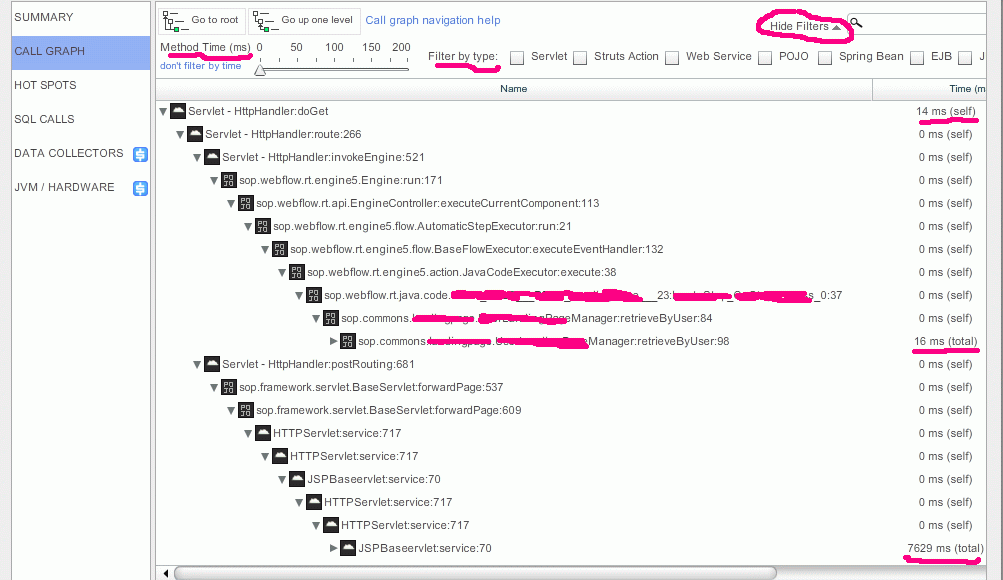
- Double-click the page name (URL) in red color and until you see the full call graph & timing of each spending.
* First, it will drill down to all sampling of the same transaction (web request)
Posted by My Tech Blog 7 comments